Tool use in Agents
Tool use enables an agent to interact with external APIs, databases, servises, or even execute code, It allows the LLM decide when and how to usee a specific external function based on the user's request.
The proces typically involves:
Tool Definition: External functions or capabilities are defined and described to the LLM. This description includes the function's purpose, its name, and the parameters it accepts, along with their types and descriptions.
LLM Decision: The LLM receives the user's request and the available tool definitions. Based on its understanding of the request and the tools, the LLM decides if calling one or more tools is necessary to fulfill the request.
Function Call Generation: If the LLM decides to use a tool, it generates a structured output (often a JSON object) that specifies the name of the tool to call and the arguments (parameters) to pass to it, extracted from the user's request.
Tool Execution: The agentic framework or orchestration layer intercepts this structured output. It identifies the requested tool and executes the actual external function with the provided arguments.
Observation/Result: The output or result from the tool execution is returned to the agent.
LLM Processing (Optional but common): The LLM receives the tool's output as context and uses it to formulate a final response to the user or decide on the next step in the workflow (which might involve calling another tool, reflecting, or providing a final answer).
This pattern is fundamental because it breaks the limitations of the LLM's training data and allows it to access up-to-date information, perform calculations it can't do internally, interact with user-specific data, or trigger real-world actions. Function calling is the technical mechanism that bridges the gap between the LLM's reasoning capabilities and the vast array of external functionalities available. While "function calling" aptly describes invoking specific, predefined code functions, it's useful to consider the more expansive concept of "tool calling." This broader term acknowledges that an agent's capabilities can extend far beyond simple function execution. A "tool" can be a traditional function, but it can also be a complex API endpoint, a request to a database, or even an instruction directed at another specialized agent. This perspective allows us to envision more sophisticated systems where, for instance, a primary agent might delegate a complex data analysis task to a dedicated "analyst agent" or query an external knowledge base through its API. Thinking in terms of "tool calling" better captures the full potential of agents to act as orchestrators across a diverse ecosystem of digital resources and other intelligent entities.
Frameworks like LangChain, LangGraph, and Google Agent Developer Kit provide robust support for defining tools and integrating them into agent workflows, often leveraging the native function calling capabilities of modern LLMs like those in the Gemini or OpenAI series. On the "canvas" of these frameworks, you define the tools and then configure agents (typically LLM Agents) to be aware of and capable of using these tools.
Tool Use is a cornerstone pattern for building powerful, interactive, and externally aware agents.
Practical Applications & Use Cases
The Tool Use pattern is applicable in virtually any scenario where an agent needs to go beyond generating text to perform an action or retrieve specific, dynamic information:
1. Information Retrieval from External Sources: Accessing real-time data or information which is not present in the LLM's training data.
-
Use Case: A weather agent.
-
Tool: A weather API that takes a location and returns the current weather conditions.
-
Agent Flow: User asks, "What's the weather in London?", LLM identifies the need for the weather tool, calls the tool with "London", tool returns data, LLM formats the data into a user-friendly response.
2. Interacting with Databases and APIs: Performing queries, updates, or other operations on structured data.
-
Use Case: An e-commerce agent.
-
Tools: API calls to check product inventory, get order status, or process payments.
-
Agent Flow: User asks "Is product X in stock?", LLM calls inventory API, tool returns stock count, LLM tells the user the stock status.
3. Performing Calculations and Data Analysis: Using external calculators, data analysis libraries, or statistical tools.
-
Use Case: A financial agent.
-
Tools: A calculator function, a stock market data API, a spreadsheet tool
-
Agent Flow: User asks "What's the current price of AAPL and calculate the potential profit if I bought 100 shares at $150?", LLM calls stock API, gets current price, then calls calculator tool, gets result, formats response.
4. Sending Communications: Sending emails, messages, or making API calls to external communication services.
-
Use Case: A personal assistant agent.
-
Tool: An email sending API.
-
Agent Flow: User says "Send an email to John about the meeting tomorrow", LLM calls an email tool with recipient, subject, and body extracted from the request.
5. Executing Code: Running code snippets in a safe environment to perform specific tasks.
-
Use Case: A coding assistant agent.
-
Tool: A code interpreter.
-
Agent Flow: User provides a Python snippet and asks "What does this code do?", LLM uses the interpreter tool to run the code and analyze its output.
6. Controlling Other Systems or Devices: Interacting with smart home devices, IoT platforms, or other connected systems.
-
Use Case: A smart home agent.
-
Tool: An API to control smart lights.
-
Agent Flow: User says "Turn off the living room lights", LLM calls the smart home tool with the command and target device.
Tool Use is what transforms a language model from a text generator into an agent capable of sensing, reasoning, and acting in the digital or physical world
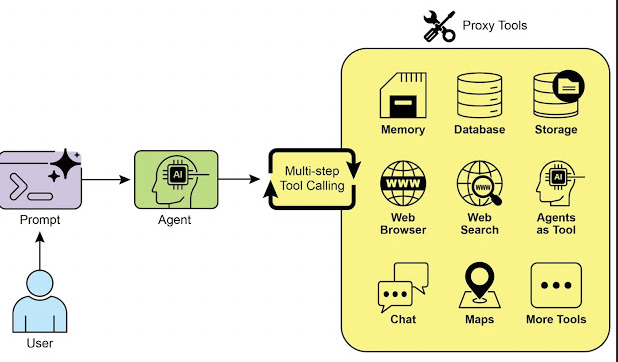
At a Glance
What: LLMs are powerful text generators, but they are fundamentally disconnected from the outside world. Their knowledge is static, limited to the data they were trained on, and they lack the ability to perform actions or retrieve real-time information. This inherent limitation prevents them from completing tasks that require interaction with external APIs, databases, or services. Without a bridge to these external systems, their utility for solving real-world problems is severely constrained.
Why: The Tool Use pattern, often implemented via function calling, provides a standardized solution to this problem. It works by describing available external functions, or "tools," to the LLM in a way it can understand. Based on a user's request, the agentic LLM can then decide if a tool is needed and generate a structured data object (like a JSON) specifying which function to call and with what arguments. An orchestration layer executes this function call, retrieves the result, and feeds it back to the LLM. This allows the LLM to incorporate up-to-date, external information or the result of an action into its final response, effectively giving it the ability to act.
Rule of thumb: Use the Tool Use pattern whenever an agent needs to break out of the LLM's internal knowledge and interact with the outside world. This is essential for tasks requiring real-time data (e.g., checking weather, stock prices), accessing private or proprietary information (e.g., querying a company's database), performing precise calculations, executing code, or triggering actions in other systems (e.g., sending an email, controlling smart devices). Visual summary:
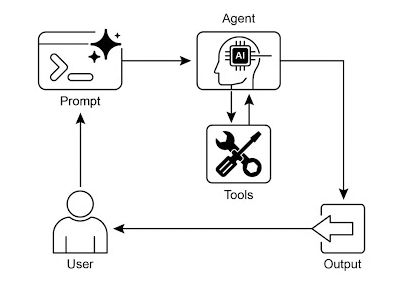
Key Takeaways
-
Tool Use (Function Calling) allows agents to interact with external systems and access dynamic information.
-
It involves defining tools with clear descriptions and parameters that the LLM can understand.
-
The LLM decides when to use a tool and generates structured function calls. Agentic frameworks execute the actual tool calls and return the results to the LLM.
-
Tool Use is essential for building agents that can perform real-world actions and provide up-to-date information.
LangChain simplifies tool definition using the @tool decorator and provides create_tool_calling_agent and AgentExecutor for building tool-using agents. Google ADK has a number of very useful pre-built tools such as Google Search, Code Execution and Vertex AI Search Tool.
Conclusion
The Tool Use pattern is a critical architectural principle for extending the functional scope of large language models beyond their intrinsic text generation capabilities. By equipping a model with the ability to interface with external software and data sources, this paradigm allows an agent to perform actions, execute computations, and retrieve information from other systems. This process involves the model generating a structured request to call an external tool when it determines that doing so is necessary to fulfill a user's query. Frameworks such as LangChain, Google ADK, and Crew AI offer structured abstractions and components that facilitate the integration of these external tools. These frameworks manage the process of exposing tool specifications to the model and parsing its subsequent tool-use requests. This simplifies the development of sophisticated agentic systems that can interact with and take action within external digital environments.